Core Web Vitals Optimization Guide for Higher Google Rankings
If your website loads slowly, jumps around while loading, or feels sluggish to interact with, Google already knows — and so do your visitors. Core Web Vitals are Google's way of measuring real-world user experience on your site, and since 2021, they have been an official Google ranking factor. Understanding how to improve Core Web Vitals is no longer optional; it is one of the most important technical SEO tasks you can undertake in 2026. In this guide, we break down what Core Web Vitals are, why they matter for your Google rankings, and — most importantly — exactly how to fix them.
What Are Core Web Vitals?
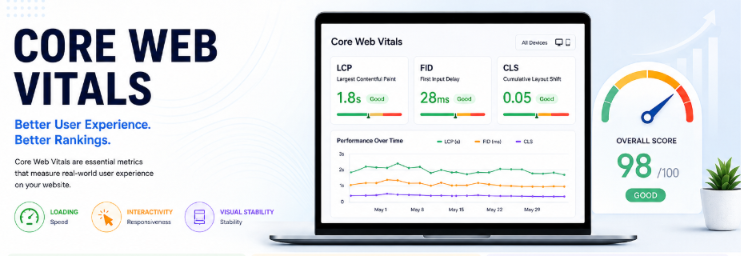
Core Web Vitals are a set of three specific page experience metrics that Google uses to evaluate the loading performance, visual stability, and interactivity of a web page. These three metrics are:
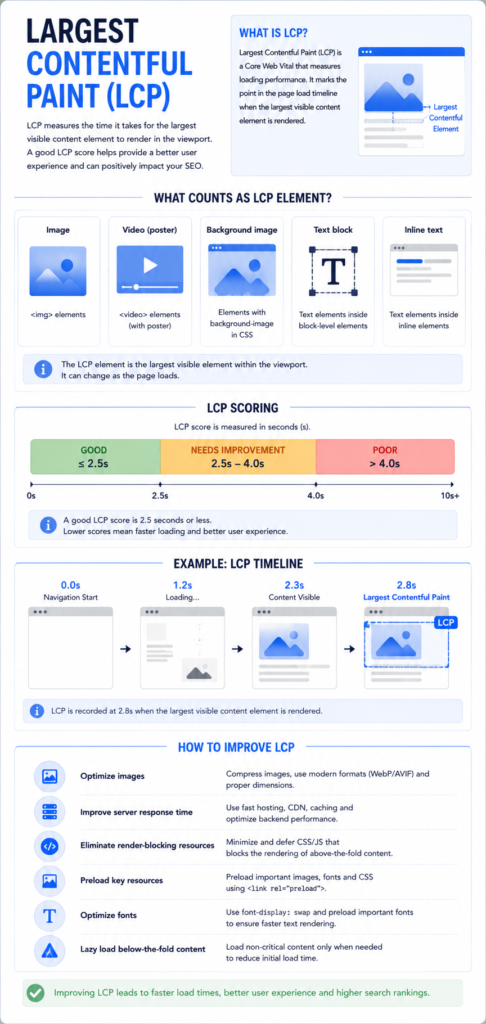
Largest Contentful Paint (LCP) — This measures how quickly the largest visible element on your page (usually a hero image or headline) loads. Google wants your LCP to happen within 2.5 seconds of the page starting to load.
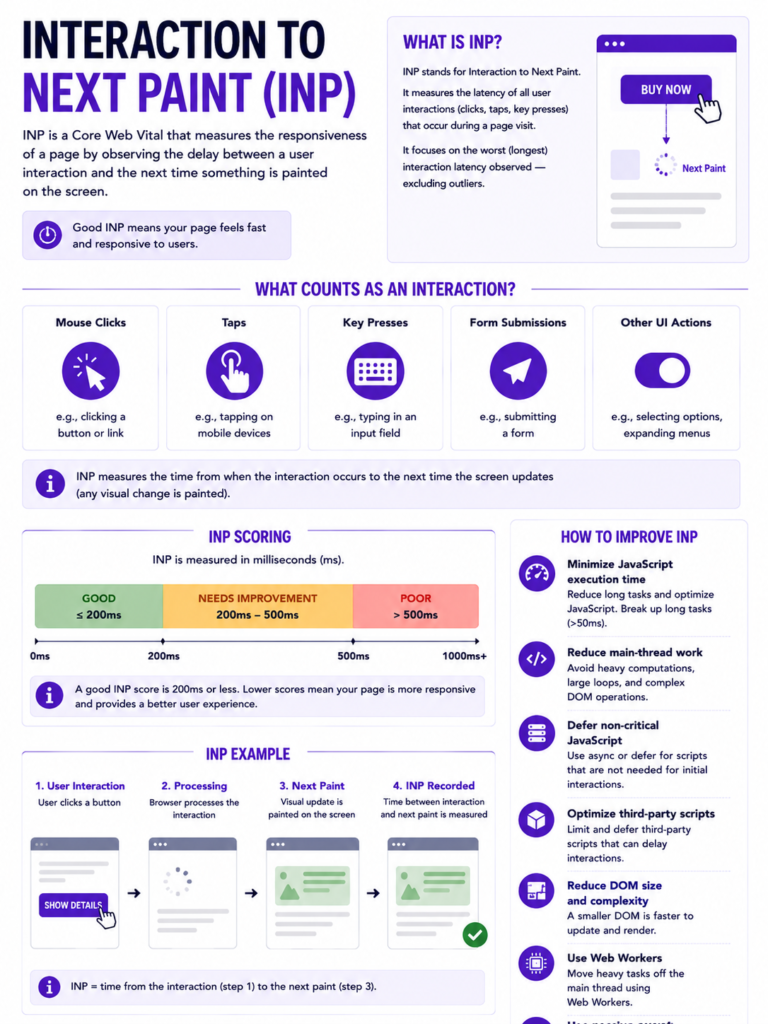
Interaction to Next Paint (INP) — Introduced as a replacement for the old First Input Delay metric, INP measures how quickly your page responds to user interactions like clicks and taps. A good INP score is under 200 milliseconds.
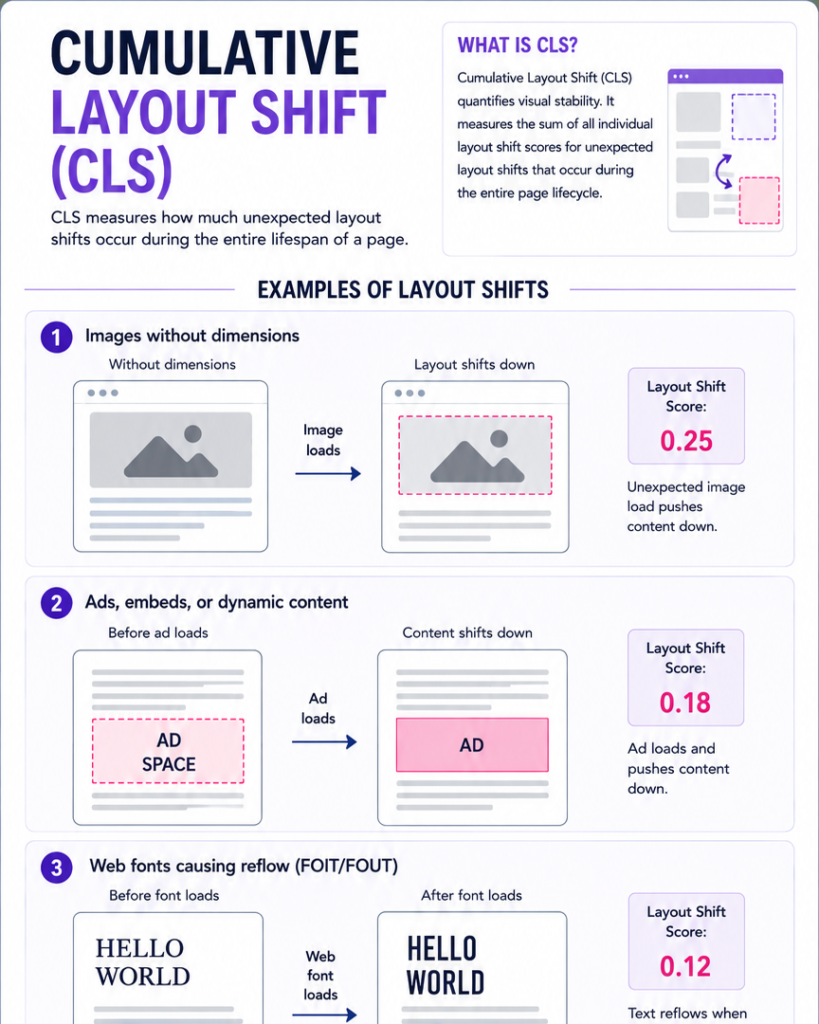
Cumulative Layout Shift (CLS) — This measures how much your page content moves around unexpectedly while loading. A low CLS score (under 0.1) means your page is visually stable and users won’t accidentally click the wrong thing.
Why Core Web Vitals Matter for Your SEO ?
Google's Page Experience update confirmed that sites delivering poor user experience will be pushed down in rankings, while sites that perform well across these metrics get a competitive advantage. But beyond rankings, Core Web Vitals directly influence your bounce rate, time on site, and conversion rate. Research consistently shows that a one-second delay in page load time can reduce conversions by up to 7%. If your pages are slow or unstable, you are losing both Google rankings and potential customers simultaneously. For businesses in Chandigarh competing for digital visibility, this is a gap that your competitors are already exploiting
How to Improve LCP (Largest Contentful Paint)
The most common causes of a poor LCP score are slow server response times, render-blocking resources, slow resource load times, and client-side rendering. Here is how to address each:
Switch to a faster hosting provider or use a CDN (Content Delivery Network) so your server responds quickly regardless of where your visitor is located. For Indian businesses, a CDN with servers in Mumbai or Singapore can dramatically reduce latency.
Compress and properly size your images. Large, unoptimized images are the number one killer of LCP scores. Use modern formats like WebP or AVIF, compress images before uploading, and always specify image dimensions in your HTML.
Eliminate render-blocking JavaScript and CSS. Use the 'defer' or 'async' attributes on your script tags and load only the CSS that is critical for above-the-fold content.
Preload your LCP resource. Add a `` tag in your HTML head for the image or resource that will be the largest contentful element on the page.
How to improve INP (interaction to next paint)
A high INP score usually means your JavaScript is doing too much work on the main thread, blocking the browser from responding to user input. Here's how to fix it: Break up long JavaScript tasks into smaller chunks. Any task that takes longer than 50 milliseconds is considered a 'long task' and will hurt your INP. Remove or defer unnecessary third-party scripts. Analytics trackers, chat widgets, and ad scripts often contribute significantly to INP delays. Load them after the page is interactive. Use a web worker for heavy computations so the main thread stays free to handle user interactions.
how to improve cLS (cumulative layout shift)
Layout shifts happen when elements on your page move unexpectedly — usually because images load without defined dimensions, ads inject content dynamically, or web fonts load and replace fallback fonts. To fix CLS: Always define width and height attributes on images and video embeds. This reserves the correct space in the layout before the media loads. Reserve space for ads and embeds. If you know an ad will be a specific size, pre-allocate that space in your CSS. Use font-display: optional for web fonts to avoid text shifting when the custom font loads.
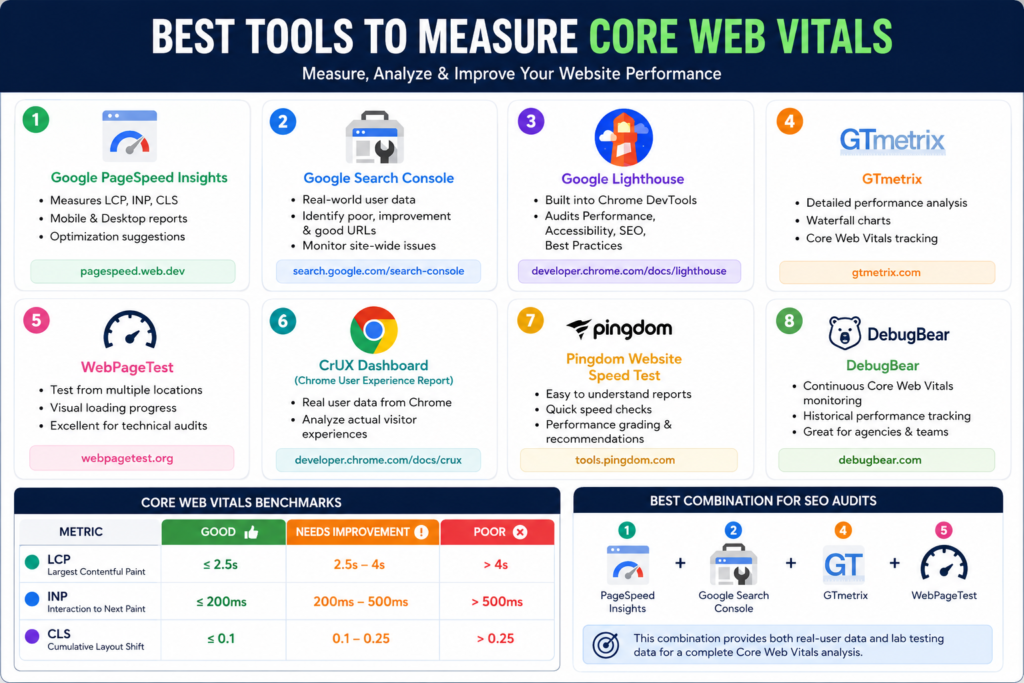
Tools to Measure and Monitor Core Web Vitals
You do not have to guess about your scores. Use these tools to identify exactly which pages have issues and what is causing them:
Google Search Console provides field data (real user data) for your Core Web Vitals in the 'Page Experience' and 'Core Web Vitals' reports. This is the most authoritative source since it reflects how real visitors experience your site.
Google PageSpeed Insights gives both field data and lab data, along with specific recommendations to fix issues on any URL.
Lighthouse (built into Chrome DevTools) lets you run on-demand audits even for pages behind logins or staging environments.
The Chrome User Experience Report (CrUX) provides real-world performance data aggregated across millions of Chrome users.